
調べることはありますか?
内容の一覧
< すべてのトピック
Print
ダウンロードが遅い時はFreeDownloadManagerを使おう。
Posted
Updated
Byfairynakata
1.ダウンロードが遅い時はFreeDownloadManagerを使おう。
FreeDownlodManagerを使いましょう。

2.インストールしたら
ブラウザのダウンロード中に以下のようにします。
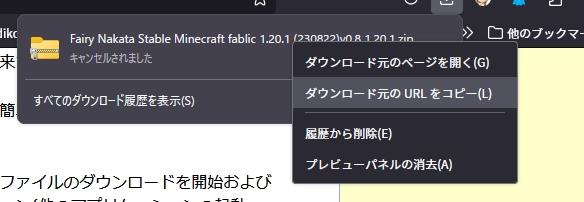
ブラウザのダウンロードから、元のURLをコピーしてブラウザのダウンロードは停止させます。
FreeDownloadManagerを起動して、
FreeDownloadManagerの左上の+ボタンを押します。
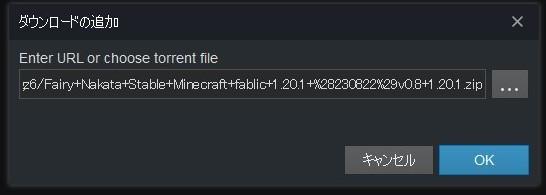
追加でOKすると、ファイル名が表示されます。
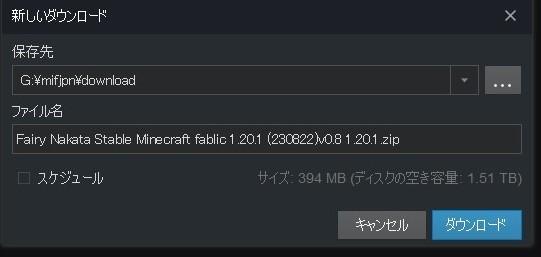
ダウンロードします。
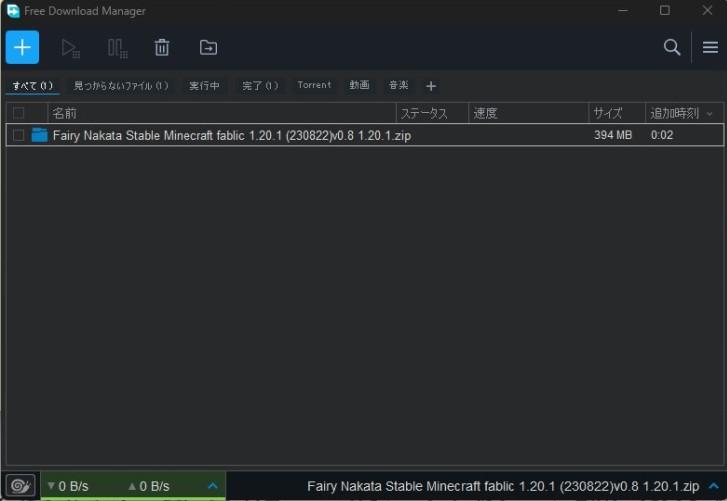
ダウンロードフォルダに入っています。
これで、早く終わるはずです。
Categories
-
初めてなので、何をしたらいいのかわかりません1
-
つなぐ前に確認すること。自己紹介とバージョンの確認をしよう。1
-
さあつなげよう!(PCの場合)3
-
さあつなげよう(スマホAndroid等の場合)1
-
さあつなげよう(Switchの場合)1
-
便利なパネル操作とボイスチャット1
-
サーバの中にあるショップ・土地の保護などやり方一般のこと7
-
各サーバ・いなくなった人の施設へのルール8
-
このサーバにつないでできることは何?2
-
どこに何がありますか?1
-
いいことはしよう、悪いことはしない3
-
基本の方法よりきれいに見せる方法(スマホ・Android版)1
-
Linux(UBUNTU)でのマインクラフトの使い方(fpsが数倍以上あがります)。2
-
Tips(知っていると便利なこと)6
-
FAQ(一般的な困りごと)3
-
相談先はどこですか?簡単なサーバスペックの紹介。2
-
お古ノートパソコンでマイクラサーバを作ろう4
-
技術的な背景8
-
Admin-Documents1